 RxLog Docs
Detections
Query detections
Query detections run a SQL query on a schedule over your stored logs.
A query detection is a saved SQL query that runs on a schedule. Each run searches your stored logs for a time window. If the query returns rows, the detection matches and raises an alert. Query detections are best when you want to check data that is already stored.
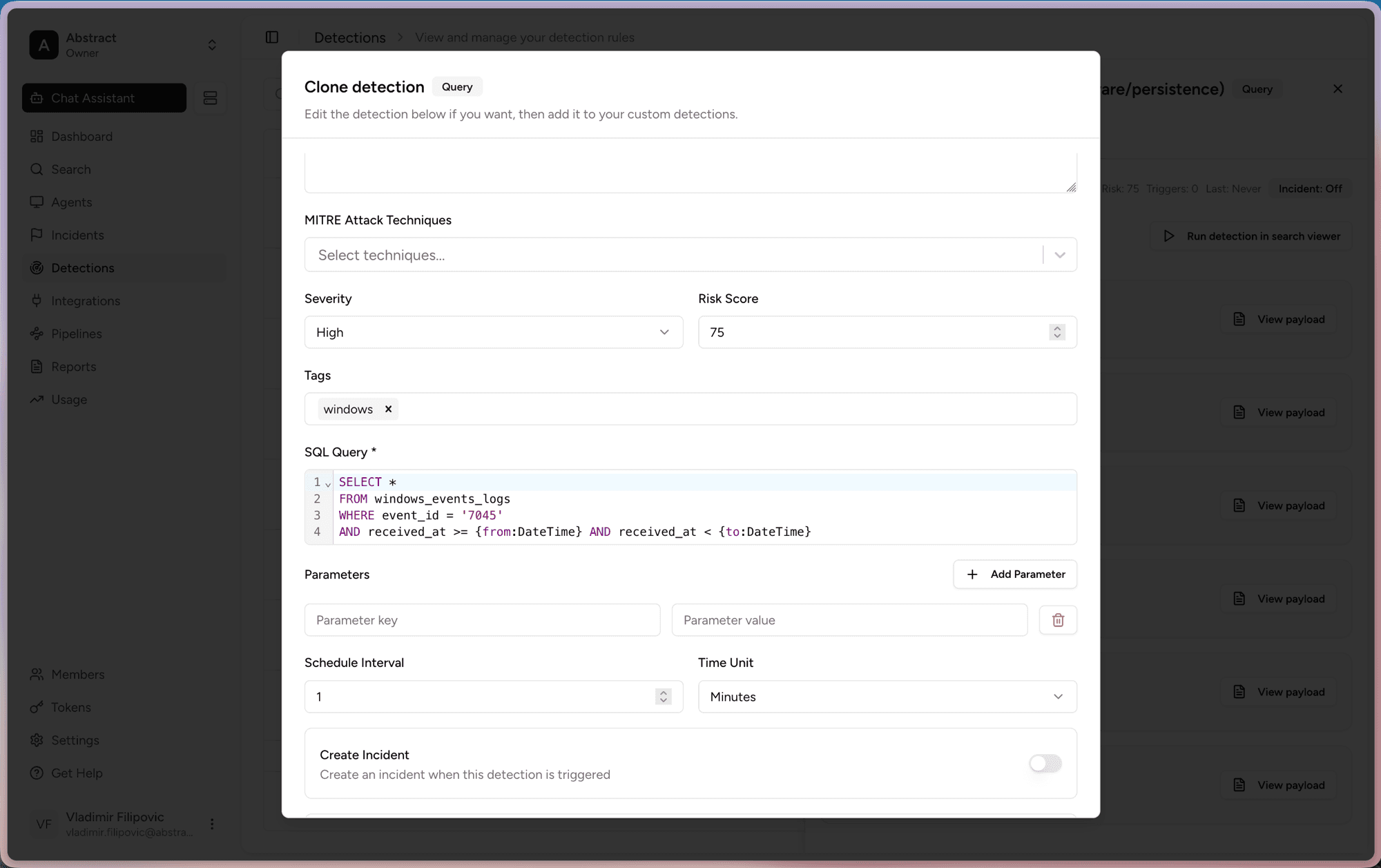
What you can set
When you create or clone a query detection, you control:
- SQL Query. The query that defines the rule. It can use parameters like
{from:DateTime}and{to:DateTime}for the time window. - Severity and Risk Score. How serious a match is.
- MITRE Attack Techniques and Tags. Labels for context and filtering.
- Schedule Interval and Time Unit. How often the query runs.
- Create Incident. Turn this on to open an incident when the rule matches.
How to create one
The easiest way to start is to clone a rule from the library and edit it.
Open Detections and find a query rule, or click Create detection.
Click Clone to open the editor.
Edit the SQL Query, set the Severity, and adjust the Schedule Interval.
Turn on Create Incident if you want matches to raise an incident.
Save the rule. It is added to your custom detections.
Add parameters under Parameters to reuse the same query with different values without editing the SQL each time.